Redesigning the membership page to cut churn
20% of SpeakX subscribers cancelled on Day 0. Nearly 50% of trial users were gone by end of week 1. The membership page was the last thing they saw before leaving, and it was working against us. I redesigned it to surface learning progress, clarify subscription value, and give users a reason to stay.
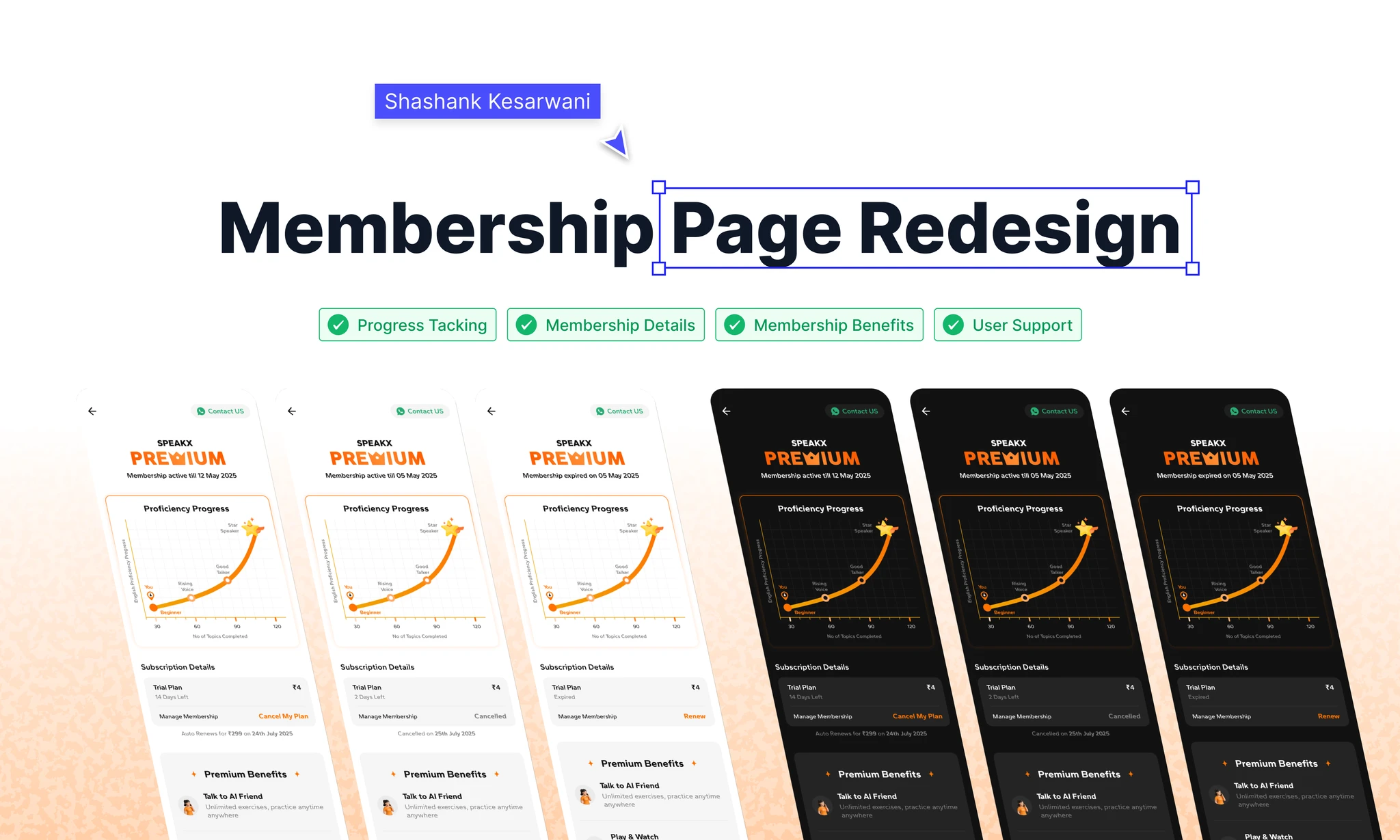
SpeakX had an acquisition engine. It had a retention problem.
SpeakX is an English-speaking EdTech platform targeting Hindi-belt users who want to improve spoken fluency for professional and personal advancement. At the time of this project, the platform had strong top-of-funnel performance: paid acquisition was converting users to trial subscriptions efficiently. The problem was what happened next.
20% of new subscribers cancelled their membership on the same day they subscribed, before they'd completed a single lesson. An additional ~30% cancelled within the first week. The cancellation rate at this stage directly impacted LTV, which in turn put pressure on acquisition CAC targets. The CPO identified the membership page as the primary intervention point: it was where users went when they were considering cancellation, and it was doing nothing to change their mind.
At ₹99/month, a 1-point reduction in Day-0 churn across the user base translated to meaningful revenue retention. The stakes were real.
The membership page was a dead end. No progress. No value. Just a cancel button.
Before the redesign, the membership page showed three things: subscription status (Active/Expired), renewal date, and a cancellation CTA. That was it. Users who arrived on the page, typically after encountering friction elsewhere in the app, found no signal of the value they'd already built up, no reinforcement of what they were paying for, and no friction between deciding to cancel and completing it.
I pulled session recordings from users who visited the membership page and cancelled. The median time between opening the page and tapping the cancel button was under 12 seconds. There was nothing on the page that gave them a reason to pause.
The page had to stay honest. We couldn't just make cancellation harder.
The constraints on this project shaped what "a good solution" could look like:
- We could not hide or obscure the cancel option. Dark patterns that bury cancellation were explicitly ruled out by the PM, and correctly so. If users can't find the cancel button, they'll leave the platform with a worse perception of it.
- The learning progress data shown on the page had to be real and current. Fabricated "streaks" or inflated milestone labels would erode trust the moment users noticed the inconsistency.
- The page had to handle three distinct states gracefully: Active subscription, Expired subscription, and Cancelled subscription. Each state had a different user intent and required different information hierarchy.
- Engineering bandwidth was limited. The design had to be achievable with the data already available in the app: we could not scope in new tracking or new backend endpoints for v1.
They weren't cancelling because the product was bad. They were cancelling because they couldn't see they were progressing.
The pattern was consistent: users who churned early were not users who'd had a bad experience. They were users who'd had no clear signal of progress. They'd completed a lesson or two, opened the membership page, seen a subscription renewal date and a cancel button, and concluded, incorrectly, that nothing was happening. The product was working. The feedback loop was invisible.
"I didn't know if I was getting better. There's no way to tell. I thought maybe this app isn't for me."
Churned user, Week-1 trial, Tier-2 cityThe reframe. The membership page wasn't just an account management screen. It was a retention surface. Its job was to remind users of the value they'd already captured and give them a concrete reason to keep paying. Every element on the page needed to serve that purpose or be removed.
Three directions explored. One shipped.
Cancellation paywall: forced win-back flow
Intercept the cancel action with a modal that shows personalised progress stats, an offer (1 month free), and a re-commitment prompt before allowing cancellation to proceed.
Progress-only redesign: no subscription management changes
Add a prominent learning progress section at the top of the existing page. Keep all subscription management UI intact below it.
Full page redesign: progress + clarity + transparent management
Rebuild the page from scratch with a progress-first hierarchy: learning graph + gamified milestone label at top, premium benefits reinforcement in the middle, and subscription management (including cancel) at the bottom, transparent but de-emphasised relative to the value content.
Show them what they've built before you ask them to decide if it's worth keeping.
The final design led with a dynamic learning progress graph, showing the user's speaking sessions plotted over time, alongside a gamified milestone label (titles like "Rising Voice" and "Star Speaker") that updated based on cumulative practice time. The framing was deliberate: before the user reached any subscription controls, they had to scroll past a concrete record of their own progress.
Below the progress section: a benefit grid reinforcing the four core premium features: AI practice sessions, grammar mastery tracks, video reels, and daily routines. This was not upsell copy. It was a reminder of what the subscription already included and what would be lost.
Subscription management lived at the bottom, with three clearly differentiated state designs: Active (renewal date, payment method, cancel option), Expired (renewal prompt, clear pricing), Cancelled (reactivation CTA, no pressure framing). Transaction history and support access were included here, both had been missing entirely in the previous design and were surfacing as support tickets.
The trade-off I accepted explicitly: we were making the cancel option slightly harder to find (scroll depth), not harder to use. Any user who wanted to cancel could still cancel in two taps. We were betting that the additional context would change the decision, not that the additional scroll would prevent it.
What shipped, what got cut, and what made it to v2.
What shipped in v1. Progress graph (using existing session data), gamified milestone labels (5 tiers: Beginner, Rising Voice, Consistent Learner, Star Speaker, Fluency Champion), premium benefit grid, status-based subscription management UI, transaction history, FAQ module, support access.
What didn't. The social milestone sharing feature was descoped for timeline. The gifted subscription state was deferred to v2 as it represented less than 2% of the user base.
v2 targets. Comparative progress view, personalised benefit highlights based on feature usage, and the social milestone share card.
Numbers measured 4 weeks post-launch.
"The approach was right: surface what users have already earned before asking them whether to keep paying. The data validated the hypothesis. A 28% growth in retention at this scale is material revenue."
Paramjit · Product Manager, SpeakXWhat I'd do differently. What I'll carry forward.
What I'd do differently. I'd push harder for the comparative progress data even if it meant a longer timeline. The "you've improved X% from last month" framing was the single most motivating element in user testing, and it didn't ship. A retention-focused redesign without its most powerful lever is a compromise I accepted too quickly under timeline pressure.
What I underestimated. The emotional weight of the milestone labels. In testing, "Star Speaker" generated disproportionate positive reaction: users wanted to show it to someone. I didn't design a share mechanism for v1 and left retention value on the table. Social proof and sharing for earned milestones should have been in scope from the start.
What I'll carry forward. Retention surfaces need a progress-first information architecture. The default instinct is to show account management: status, billing, controls. But users visiting a retention-risk surface need to be reminded of accumulated value first. The product earned that retention; the page just had to show it.